hi
i want to allow access to our local database from another company site location that also has DOORS - does the remote site have to do a second install and enter our port number and license etc or is there another way to do this?
thanks
doorsuser77 - Wed Jul 22 05:19:56 EDT 2015
Re: remote access to doors database
knobutan - Wed Jul 22 21:24:30 EDT 2015
Hi,
If they have DOORS client on their machine and have an access to your DOORS server machine, they can switch where their DOORS client points to by adding a parameter when they launch DOORS client.
They can edit their DOORS shortcut target field.
For example.
"C:\Program Files\IBM\Rational\DOORS\9.6\bin\doors.exe"
"C:\Program Files\IBM\Rational\DOORS\9.6\bin\doors.exe" -d 36677@DoorsServer
No need to tell them your license detail. They can use their own license to connect to your DOORS db.
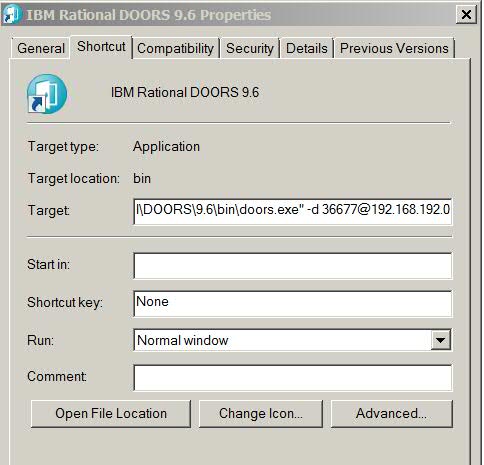
Hope it helps.
Re: remote access to doors database
llandale - Wed Aug 05 19:43:54 EDT 2015
knobutan - Wed Jul 22 21:24:30 EDT 2015
Hi,
If they have DOORS client on their machine and have an access to your DOORS server machine, they can switch where their DOORS client points to by adding a parameter when they launch DOORS client.
They can edit their DOORS shortcut target field.
For example.
"C:\Program Files\IBM\Rational\DOORS\9.6\bin\doors.exe"
"C:\Program Files\IBM\Rational\DOORS\9.6\bin\doors.exe" -d 36677@DoorsServer
No need to tell them your license detail. They can use their own license to connect to your DOORS db.
Hope it helps.
Yes. To which I add: you can have a 2nd install only if the 2nd version is a full version less than the current. You can install v8.3 if there is already a 9.5 on the client PC. But what is the point? This only works because the v8 install doesn't look for the existence of a v9 install.
-Louie